End of Life is the date a vendor stops selling a product. End of Support is the later date the vendor stops patching and helping with it. The first is a planning signal. The second is a security cliff, because from that day routine vendor fixes stop, so newly discovered vulnerabilities may stay open indefinitely while the product carries on working as if nothing had changed.
A car maker discontinues your model. The dealer stops selling it, but parts and servicing carry on, so nothing about your daily drive changes. Years later the manufacturer stops making parts altogether. From that day, a new fault has no factory part waiting for it. The car still starts every morning, which is exactly why nobody worries about it. Technology products retire in the same two stages, and an organisation that treats them as one stage ends up explaining a preventable breach.
The ISC2 exam outline lists these two dates explicitly under asset retention in Domain 2, Asset Security (objective 2.5), and managing the patching and vulnerability assessment risk they create also relates to Domain 7, Security Operations (objective 7.8). This guide covers what each date means, why only one of them is dangerous, what a well-run organisation does between them, and how a scenario may try to blur the two.
What do End of Life and End of Support mean?
Every product lives on a timeline. It launches, it sells, it is supported, and one day the vendor draws two lines across that timeline. Vendors name and sequence the milestones differently, and some, such as Cisco, use End of Life for the whole retirement process rather than for one date. This guide teaches the common two-date model, and a later section shows how to map any vendor’s vocabulary onto it.
End of Life, also called End of Sale
End of Life is the date the vendor stops selling or manufacturing the product. After it, no new units, licences or subscriptions can be bought, and the product leaves the catalogue. Many vendors call this End of Sale, and some publish End of Sale and End of Life as separate dates a short distance apart. For planning purposes they carry the same message: you can no longer buy it, so the replacement needs a plan.
What End of Life does not mean is abandonment. Existing customers typically keep receiving security patches and technical help for a defined transition period, sometimes several years. The product is off the shelf, but it is not yet unsafe.
End of Support, also called End of Service Life
End of Support is the date the vendor stops everything: no more security patches, no more updates, no more technical help. Some vendors call it End of Service Life, and some publish a separate End of Security Updates date that in practice is the one that matters. Technical assistance, hardware servicing and security updates can end on different dates, so record each deadline separately.
From this date forward, routine security fixes are no longer available under any support arrangement, so a newly discovered vulnerability may stay open indefinitely. Vendors have occasionally issued exceptional fixes for retired products, but nobody can plan on one. That is what turns a working system into a growing liability.
End of Life: the planning signal
The moment a vendor announces End of Life, the clock becomes visible. Nothing about the security of the product changes that day, and that is why the date is easy to file and forget. Its job is to start a project, not to end one.
Three things are true at End of Life:
- The product can no longer be bought, so any expansion, replacement of failed units or additional licensing now has to come from a successor product or a different vendor.
- No new versions or features will ever be released. The product is frozen at its final version.
- Support and security patches usually continue for a published period, which is the window the organisation has to migrate calmly.
The mature response is to put both dates in the asset register the day they are announced, and to open the replacement project immediately. The migration window is a gift with an expiry date on it, and the whole point of End of Life is to tell you how long you have.
End of Support: the security cliff
End of Support is the date security professionals care about, because it is the date after which risk only accumulates. The vendor’s safety net is gone. A weakness found in the product from that day onward has no routine patch coming, and attackers know it.
Two things make this stage quietly lethal. First, the system keeps running. Nothing breaks on the End of Support date, there is no alert, and the system does its job on the following Monday exactly as it did the Friday before. Second, the exposure grows on a schedule the organisation does not control: each public vulnerability disclosure that touches the product can add a hole the vendor will not close.
The best-known example is Windows 7. Ordinary support ended on 14 January 2020, and estates kept running it because it still worked. Microsoft sold Extended Security Updates for eligible systems until 10 January 2023, covering critical and important fixes only and, in Microsoft’s own words, neither extending the product lifecycle nor restoring general support. Machines outside that scheme, or still running after it closed, have had no routine fix for anything disclosed since. Paid extensions of this kind are a stopgap with their own end date, not a strategy.
End of Life and End of Support on one timeline
Put both dates on one timeline and the distinction becomes a single sentence. End of Life: you cannot buy it. End of Support: you cannot count on a fix.
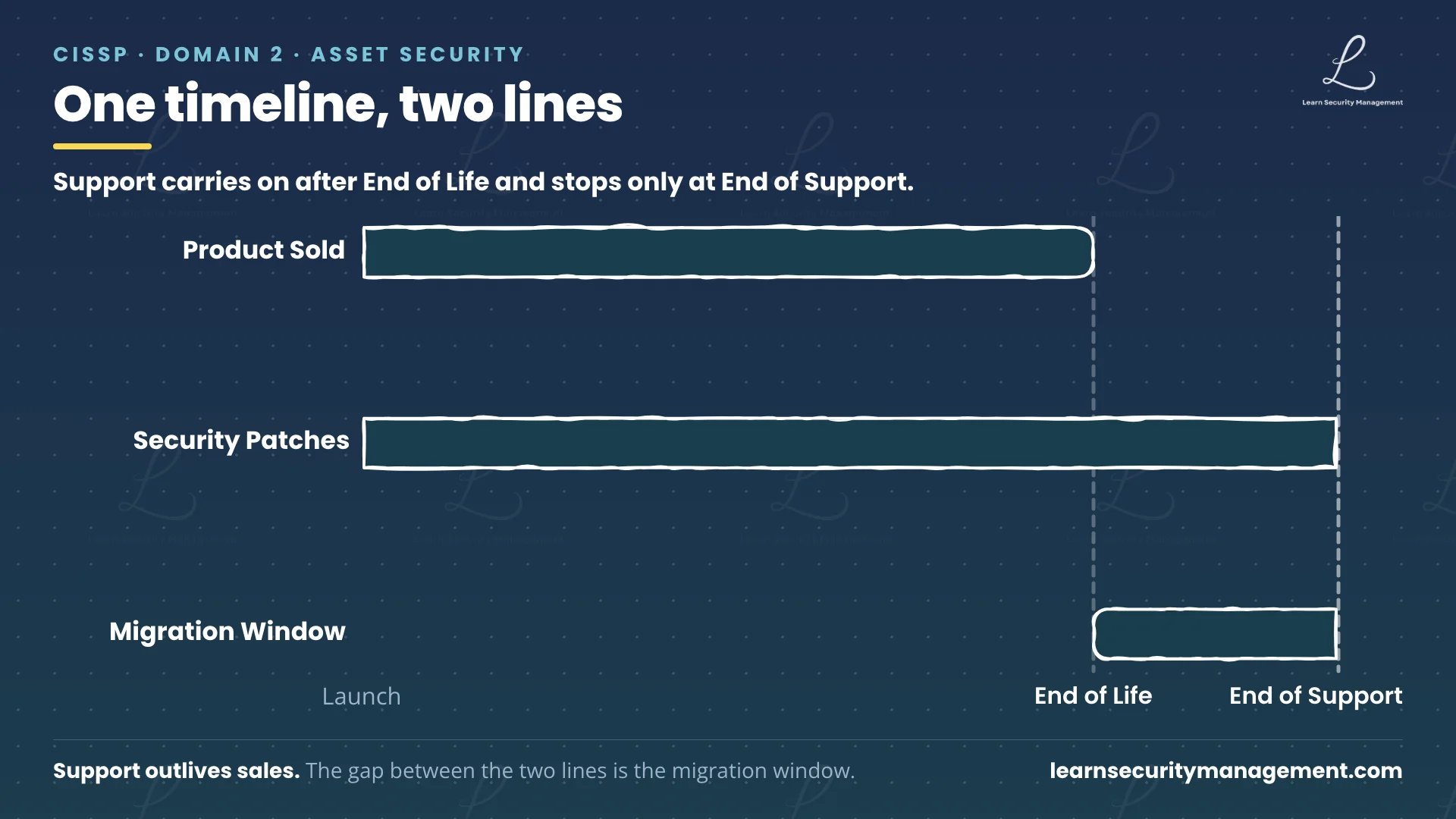
The gap between the two lines is the migration window, and its width is the vendor telling you how long you have.
| End of Life | End of Support | |
|---|---|---|
| Also called | End of Sale | End of Service Life |
| What stops | Sales, manufacturing, new versions | Patches, updates, technical help |
| What continues | Support and security patches, for a published period | No routine patches or help |
| Security impact | None on the day; the clock becomes visible | New vulnerabilities may stay open indefinitely |
| Order | Comes first | Comes later |
| What it tells you | Start planning the replacement | The risk is now live |
The two rows that matter most for a scenario are “what continues” and “order”. A product past End of Life may still be patched. A product past End of Support cannot count on it.
Why systems past End of Support get breached
Nothing visibly breaks on the End of Support date, but from then on the list of known vulnerabilities left unpatched grows with each new disclosure, on top of any that were already open. The system’s uptime graph stays flat while its exposure graph climbs, and only one of those graphs is on the dashboard.
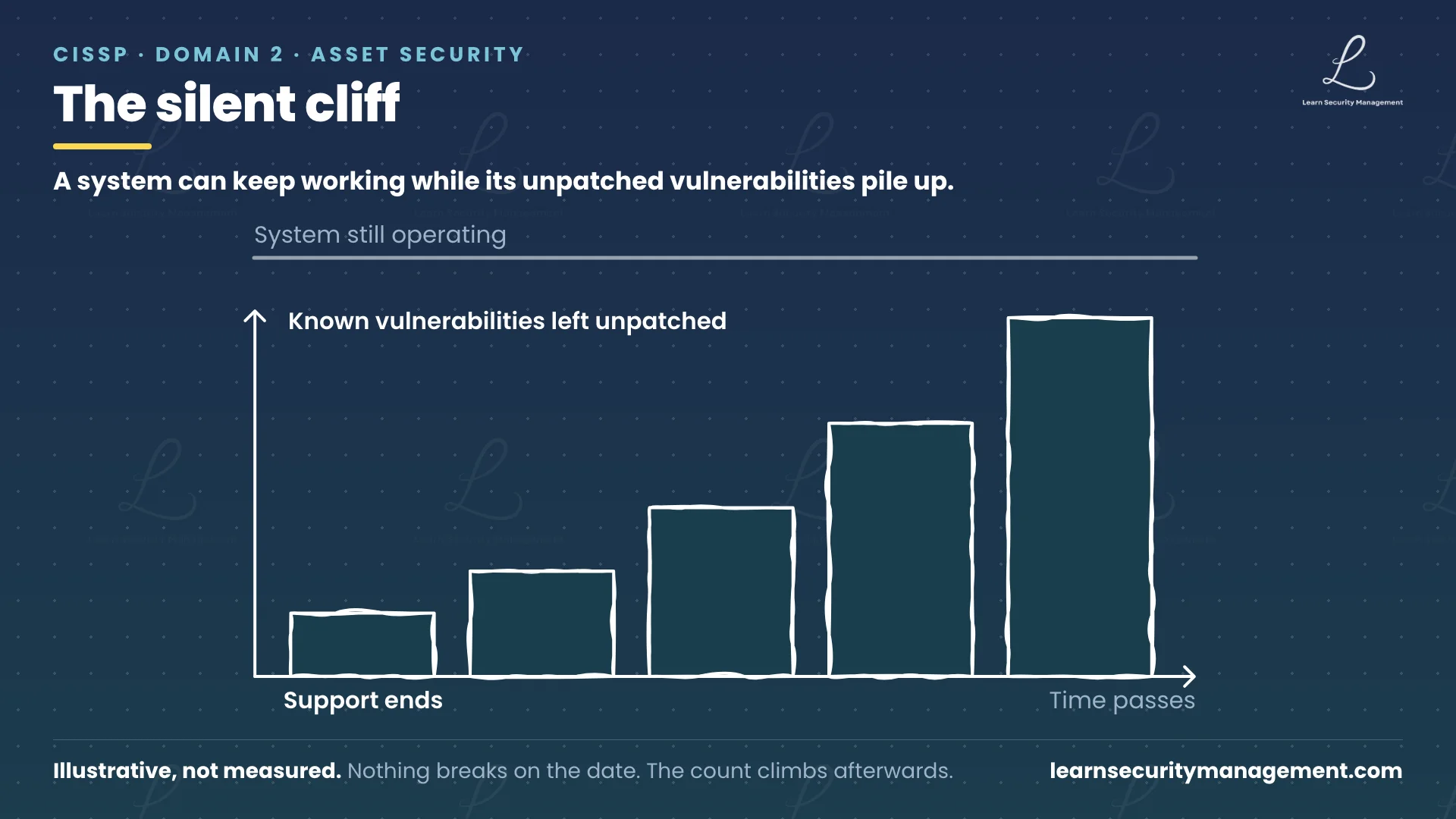
Unsupported systems create four operational risks:
- Attackers scan for these systems deliberately. A system past End of Support is a known quantity. Each new disclosure against it may be a lasting way in, so it is worth an attacker’s time to find.
- Every new vulnerability disclosure is an incident in waiting. On a supported product a disclosure starts a patch cycle. On an unsupported one it starts nothing, and the weakness simply joins the list.
- Compliance findings can arrive before anything is exploited. Many control frameworks treat unsupported software as an unmanaged risk, so the finding can land on the auditor’s schedule rather than the attacker’s.
- The system’s reliability works against you. Because it rarely fails, it never rises to the top of anyone’s list, and the organisation keeps making decisions that assume it will be there next year.
NIST SP 800-40 Rev. 4, Guide to Enterprise Patch Management Planning, treats software that can no longer be patched as part of risk-response planning rather than as an edge case: unpatchable assets are to be identified and tracked, isolated or otherwise mitigated, and carried under a maintenance plan until they are replaced.
How to manage systems approaching End of Support
Start the replacement project when End of Life is announced and finish it before End of Support. If a system genuinely must run past that date, it cannot simply stay as it was.
- Both dates go into the asset register the day the vendor announces them. A published End of Support date is a known, dated, certain risk, and almost nothing else on a risk register comes with a vendor-guaranteed deadline attached.
- Migration planning starts at End of Life, not when End of Support arrives. The published transition period is the project’s timeline, and change management is how the replacement lands without creating a new outage.
- Retirement before End of Support is the default policy, and any exception is documented, time-limited and approved by the accountable risk owner. A policy line is what stops the decision being remade, badly, under deadline pressure.
- Finding an End of Support system in production is a risk event, not a maintenance ticket. It goes on the risk register with an owner, a risk treatment decision and a date.
A legacy platform sometimes runs a manufacturing line, a medical device, or a bespoke application whose vendor no longer exists, and the replacement is two budget cycles away. Then the answer is to reduce the exposure deliberately, not to look away.
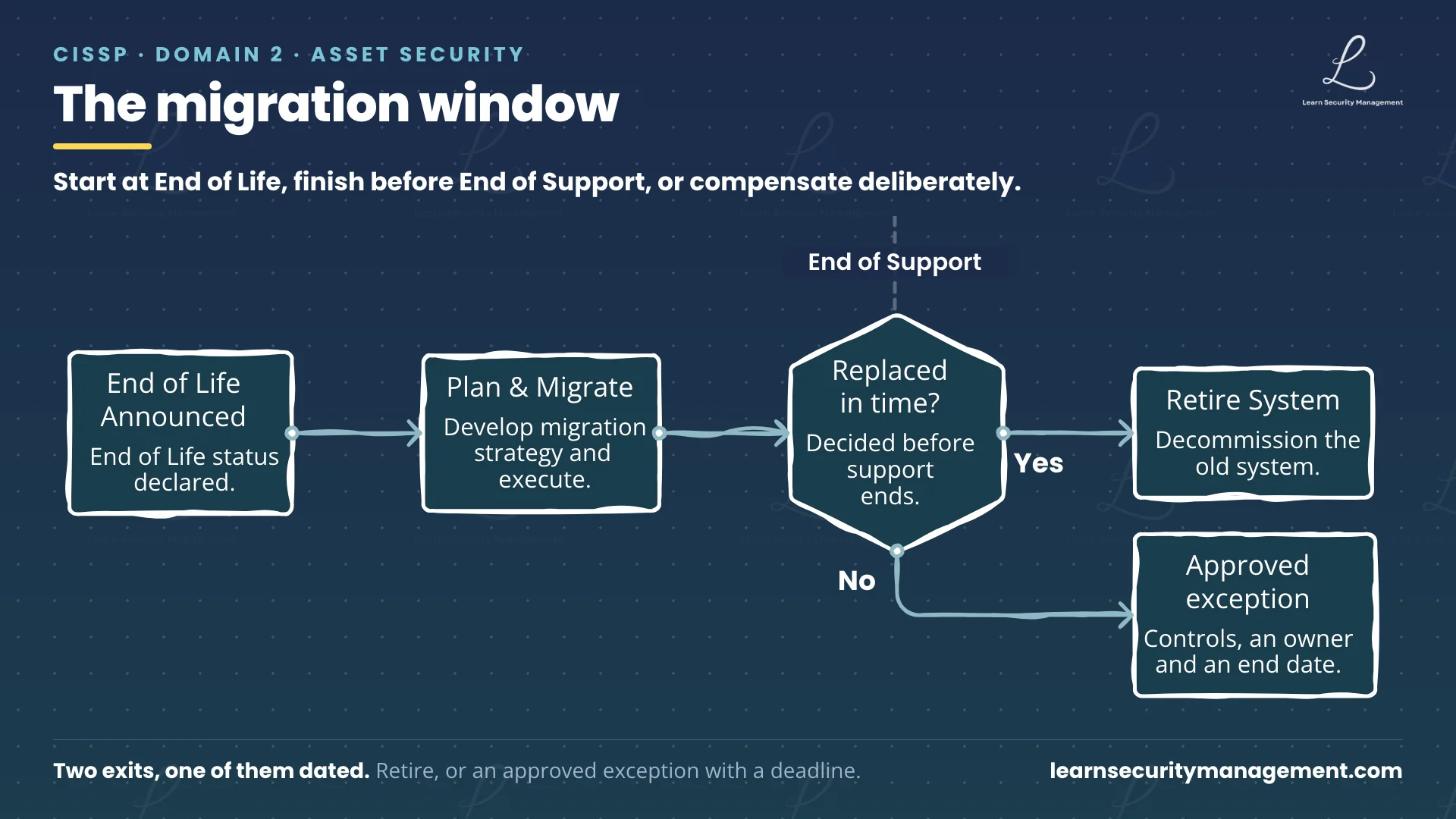
Compensating controls reduce the exposure while replacement proceeds. With compensating controls in place, put the system on its own network segment, restrict what can reach it and what it can reach, remove any services it does not need, and monitor it more closely than anything supported. Those controls lower the likelihood or the impact of exploitation; they do not remove the vulnerability, so the residual risk is recorded and accepted by a named owner, with a review date and the date the replacement is funded to land. An unsupported system that nobody is watching is the one that ends in a breach.
Regular vulnerability assessments are the tripwire. A scanner that reports the operating system version and the vendor’s support status can find End of Support systems before an attacker or an auditor does, provided the inventory is complete and somebody reads the report.
Why vendors use End of Life and End of Support differently
The concepts are simple. The vocabulary is not, and most real-world confusion comes from vendors rather than from candidates.
- Vendor terminology drifts. End of Sale, End of Life, End of Support, End of Service Life, End of Security Updates, End of Extended Support: the same two milestones appear under six names, and some vendors use “End of Life” for the final date rather than the first. Read the vendor’s own definition, then map it back to the two questions: can we still buy it, and do we still get security updates.
- Long-term support labels create false comfort. A release marked as long-term support still has an End of Support date; it is simply further away. The label describes the length of the window, not its absence.
- “Supported by us” is not vendor support. An internal team that keeps a product running is providing operations, not patches. If the vendor has stopped issuing fixes, the product is past End of Support no matter how well the internal team looks after it.
- Third-party components inherit the problem. A supported application built on an unsupported library or runtime is exposed through that dependency, which is why supply chain risk management and software inventories matter here as much as anywhere else.
How the CISSP exam may test End of Life vs End of Support
Scenarios on this topic tend to turn on one question: is the situation about buying, or about fixing? A candidate who asks that question first usually finds the answer.
- If the scenario is about procurement or availability, such as renewing licences, replacing failed units or expanding an estate, it is likely to turn on End of Life.
- If the scenario is about patches, vulnerabilities or unsupported risk, it is likely to turn on End of Support.
- A stem that says a system “no longer receives security updates” is describing End of Support, whatever the vendor’s label, and the concern a well-written question is reaching for is unremediated vulnerabilities, not the age of the product and not whether it can still be purchased.
- If a scenario forces a system to remain in service past End of Support, the strongest answer is usually a compensating control, such as isolation, segmentation or monitoring, rather than accepting the risk unchanged or assuming an upgrade exists.
- An answer option that proposes to “continue monitoring and patch when available” describes something that can no longer be relied on once End of Support has passed, and is worth reading twice.
A common conceptual mistake is treating the two terms as synonyms. The order matters as much as the definitions: End of Life first, patches may still arrive; End of Support last, routine patches stop.
End of Life vs End of Support: key takeaways
End of Life stops the sales. End of Support stops the patches. The first date opens a migration window and the second closes it, and everything a security manager needs to do sits inside that window: record both dates, start the replacement at End of Life, finish it before End of Support, and if a system must cross the line, run it as an approved, time-limited exception with compensating controls and a replacement date on the risk register.
The system that still works perfectly is the one that gets forgotten, and the one that gets forgotten is the one whose vulnerability count has been climbing quietly since the day the vendor walked away.
Ready to test that under exam conditions? Our LSM CISSP practice tests are built around exactly these scenario questions: asset lifecycle dates, unsupported systems, and the compensating controls a scenario expects you to reach for, with full explanations for every answer.
Quick reference for the CISSP exam
End of Life is the date a product stops being sold. End of Support is the later date it stops being patched. Only the second date removes the vendor’s routine security fixes.
End of Life and End of Support defined
- End of Life (End of Sale): sales and manufacturing stop, no new versions, support usually continues for a published period. The planning signal.
- End of Support (End of Service Life): patches, updates and technical help stop. Later vulnerabilities may stay open indefinitely. The security cliff.
The End of Life vs End of Support discriminator
- End of Life: you cannot buy it.
- End of Support: you cannot count on a fix.
Managing End of Support in practice
- Records both dates in the asset register on announcement.
- Starts migration at End of Life and finishes before End of Support.
- Retires systems before End of Support by default; any exception is time-limited and approved by the risk owner.
- Treats an End of Support system found in production as a risk event.
- Where a system must stay, applies compensating controls: isolation, segmentation, restricted access, close monitoring, a review date and a funded replacement date.
Reading an End of Support scenario
- Buying, licensing, replacing units: End of Life.
- Patches, vulnerabilities, “no longer receives updates”: End of Support.
- Must stay in service past End of Support: compensating controls, not unchanged acceptance.